Access 2000
Adding Form Records

Introduction
By the end of this lesson, you should be able to:
- Open a form in an existing database
- Navigate a form in an existing database
- Add form records
Opening a form
Forms , another type of database object , provide a way for Access users to enter data into a database without having to know how a table is designed .
To open an existing form:
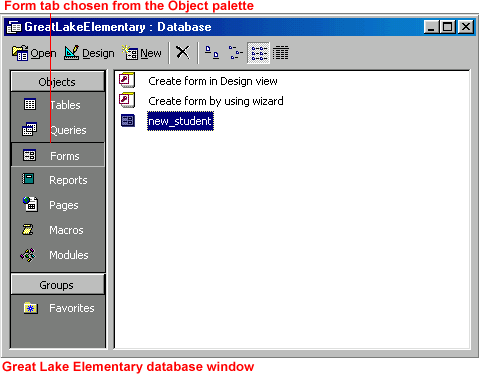
- Open the Great Lake Elementary School database.
- In the database window, choose the Forms tab from the Objects palette.
-
To open a form, double-click it, select it, and click the
Open
button,
 or right-click it and choose
Open
from the shortcut menu.
or right-click it and choose
Open
from the shortcut menu.
Navigating a form
Navigating —or moving through records in a form—lets you review , add , and edit information.
Like Datasheet view , the Form view window contains a status area (shown below) in the lower-left corner. Use the arrows to navigate the forms.

 Use the keyboard to navigate the fields in a form using the following keys:
| Key: | Selects the: |
| Tab | Next field to the right |
| Shift+Tab | Next field to the left |
| Down Arrow | Field below the current record |
| Up Arrow | Field above the current record |
Adding records in a form
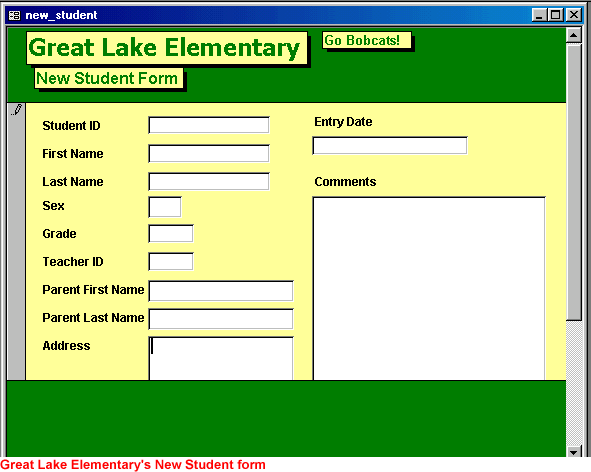
The data entry form is the easiest way to enter records.
To add a record:
-
Click the
New Record
button.

- A blank entry form consisting of several blank fields displays.
- Type the appropriate field information. For example, if the field label reads First Name , type the first name of the individual you are entering into the database.
- Press Enter or Tab to move from one field to the next, or click in the field using your mouse.
- Type the rest of the appropriate information.
Challenge!
Add a form record by doing the following:
- Open the Great Lake Elementary School database.
- In the database window, choose the Forms tab from the Objects palette.
- Double-click the New Student form to open it.
- Practice navigating the form.
- Click the New Record button to display a blank entry.
-
Enter the following data for new student Amanda Lewis:
- Student Name : Amanda Lewis
- Student ID : 999887777
- Grade: 4
- Teacher ID : 4
- Parent Name : Thurman Lewis
- Address : 456 Tutor Drive
- City: Anytown
- Phone: 1012339571 (do not attempt to preformat the number)
- Use Enter or Tab to move from one field to the next.
- Close the form.
- Double-click on the New Student form to reopen it.
- Check to see if Access 2000 saved your addition. Remember, Access saves records automatically.
- Close the New Student form.